Enterprise applications rarely stop at storing data-they must also answer an equally important question:
Who changed what, when, and why?
Whether you’re building HR systems, government portals, customer service platforms, or financial applications on Liferay DXP, maintaining an audit trail is often a compliance requirement rather than a feature.
While Liferay Objects make low-code application development incredibly fast, they don’t automatically provide a comprehensive historical record of every modification. That’s where Model Listeners become extremely valuable.
In this guide, you’ll learn how to build a reusable audit trail for Liferay Objects using Model Listeners with minimal impact on your existing applications.
Why Audit Trails Matter
An audit trail records every significant change made to business data.
Typical information includes:
- User who performed the action.
- Timestamp.
- Operation performed.
- Previous values.
- New values.
- Source object.
- Record identifier.
Organizations rely on audit trails for:
- Regulatory compliance.
- Security investigations.
- Troubleshooting.
- Data recovery.
- Business analytics.
- Operational transparency.
Without proper auditing, identifying unauthorized changes becomes extremely difficult.
Understanding Liferay Objects
Liferay Objects allow developers and business users to create business entities without manually creating database tables or writing extensive backend code.
Examples include:
- Customer Requests
- Employee Records
- Vendor Registrations
- Product Catalogs
- Leave Applications
- Complaint Management
This dramatically reduces development time.
However, every create, update, or delete operation may require tracking.
Why Use Model Listeners?
A Model Listener is a server-side extension point that automatically executes when an entity changes.
It listens to lifecycle events like:
- Before Create
- After Create
- Before Update
- After Update
- Before Remove
- After Remove
Instead of modifying every application individually, you centralize auditing in one reusable component.
Benefits
- No UI changes required.
- Works automatically.
- Easy to maintain.
- Centralized logic.
- Supports multiple Objects.
- Enterprise-ready.
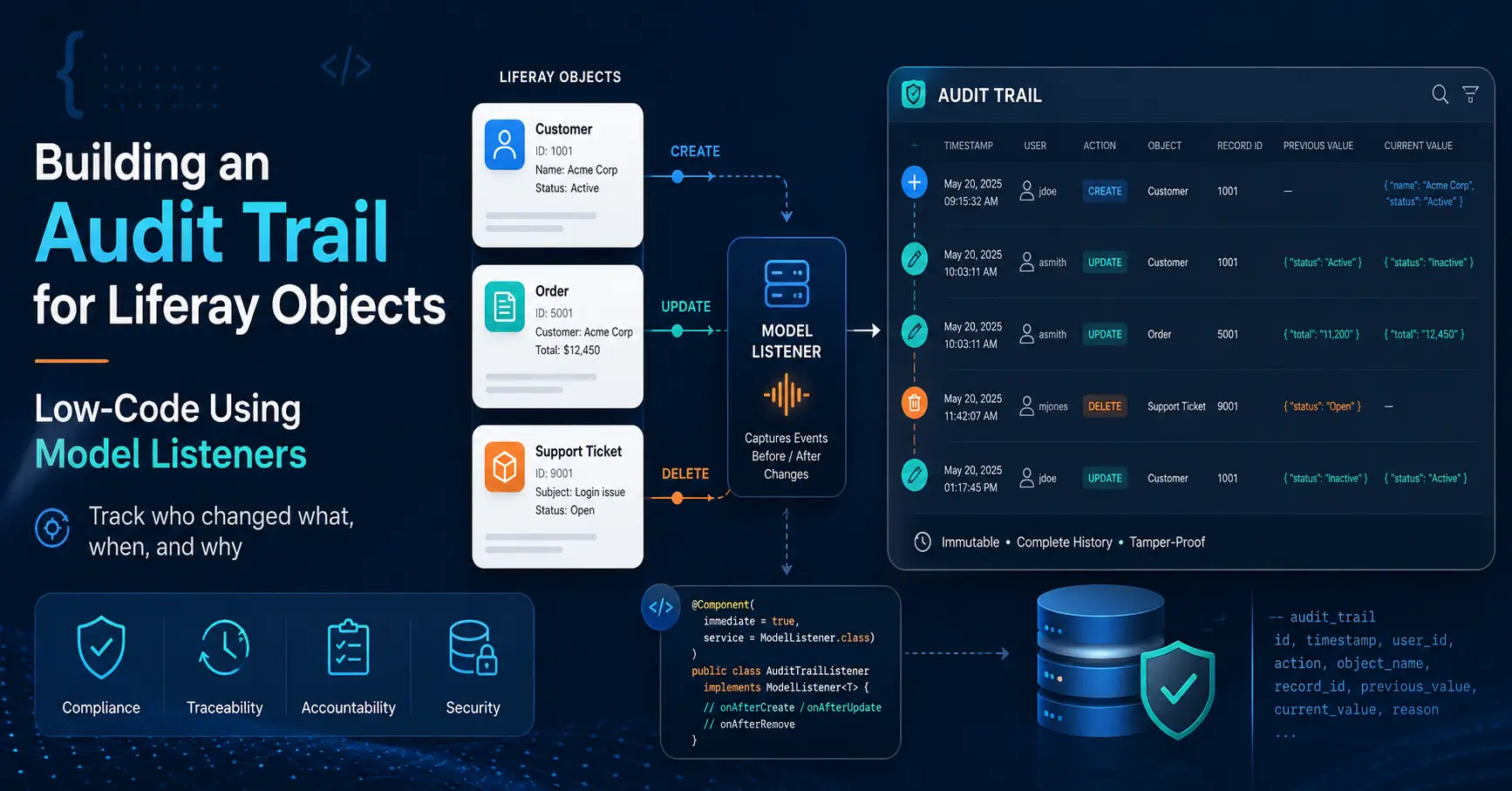
High-Level Architecture

Creating an Audit Object
The simplest approach is creating another Liferay Object dedicated to audit records.
Example fields:
| Field | Type |
|---|---|
| Object Name | Text |
| Record ID | Long |
| Event Type | Text |
| Username | Text |
| User ID | Long |
| Timestamp | DateTime |
| Previous Value | Long Text |
| Current Value | Long Text |
| IP Address | Text |
| Additional Info | Long Text |
This keeps audit data separate from business data.
Implementing a Model Listener
Create a component extending BaseModelListener.
					@Component(
   immediate = true,
   service = ModelListener.class
)
public class EmployeeObjectModelListener
   extends BaseModelListener<ObjectEntry> {

   @Override
   public void onAfterCreate(ObjectEntry objectEntry)
       throws ModelListenerException {

       auditService.logCreate(objectEntry);
   }

   @Override
   public void onAfterUpdate(ObjectEntry original,
                             ObjectEntry updated)
       throws ModelListenerException {

       auditService.logUpdate(original, updated);
   }

   @Override
   public void onAfterRemove(ObjectEntry objectEntry)
       throws ModelListenerException {

       auditService.logDelete(objectEntry);
   }

   @Reference
   private AuditService auditService;

}
This listener automatically captures lifecycle events without modifying the Object definition.
Capturing Changes
Example audit payload:
					AuditRecord audit = new AuditRecord();

audit.setObjectName(objectEntry.getModelClassName());
audit.setRecordId(objectEntry.getObjectEntryId());
audit.setUserId(objectEntry.getUserId());
audit.setUsername(objectEntry.getUserName());
audit.setAction("UPDATE");
audit.setTimestamp(new Date());

auditService.save(audit);
For updates, compare old and new values before storing.
Example:
					if (!Objects.equals(
       originalValues.get("status"),
       updatedValues.get("status"))) {

   // Save change
}
This avoids storing unnecessary data.
Example Audit Record
| Field | Value |
|---|---|
| Object | Employee |
| Record ID | 2035 |
| Action | UPDATE |
| User | John Smith |
| Previous Status | Pending |
| Current Status | Approved |
| Date | 12 July 2026 |
| Time | 14:45 UTC |
Model Listener vs Object Actions
| Feature | Model Listener | Object Action |
|---|---|---|
| Runs on CRUD | Yes | Yes |
| Java Customization | Yes | No |
| Complex Logic | Yes | No |
| External APIs | Yes | Limited |
| Performance | High | Medium |
| Reusable | High | Medium |
| Enterprise Flexibility | Excellent | Moderate |
Recommendation: Use Object Actions for simple workflows and notifications. Use Model Listeners when implementing enterprise-grade auditing, integrations, or advanced business logic.
Best Practices
Capture Only Required Fields
Avoid storing every field if only a subset is required for compliance.
Store Diffs Instead of Entire Objects
Recording only changed values significantly reduces storage requirements.
Keep Audit Data Immutable
Audit records should never be edited after creation.
Avoid Heavy Processing
Model Listeners execute during transactions. Delegate expensive operations to asynchronous jobs where appropriate.
Separate Audit Storage
Maintain audit logs in dedicated Objects or database tables.
Protect Sensitive Data
Never log:
- Passwords
- Authentication tokens
- Credit card numbers
- Personally identifiable information unless required
Common Mistakes
Common Mistakes to Avoid
- Logging every field change.
- Writing audit logic inside controllers.
- Blocking transactions with slow external APIs.
- Ignoring delete operations.
- Allowing audit records to be modified.
- Forgetting timezone consistency.
Performance Considerations
Large enterprise portals may process thousands of Object updates per hour.
Recommendations:
- Batch writes when possible.
- Serialize JSON efficiently.
- Index audit tables.
- Archive old records.
- Monitor database growth.
Properly designed listeners introduce minimal overhead while providing long-term traceability.
Security Considerations
Audit data is valuable but sensitive.
Implement:
- Role-based access.
- Encryption for sensitive values.
- Retention policies.
- Backup strategies.
- Access logging.
- Read-only permissions for audit records.
Real-World Use Cases
Government Portals
Track permit approvals, citizen requests, and administrative actions.
HR Systems
Record employee profile changes, promotions, and leave approvals.
Financial Applications
Maintain transaction history for compliance audits.
Healthcare Platforms
Capture patient record modifications while meeting regulatory requirements.
Customer Service Portals
Track ticket status changes and assignment history.
Conclusion
Liferay Objects significantly accelerate enterprise application development, but enterprise systems require more than CRUD functionality – they require accountability.
By combining Model Listeners with a dedicated audit service, you can implement a scalable, reusable, and compliance-ready audit trail without cluttering your business logic.
This approach offers the flexibility of custom Java development while preserving the productivity benefits of Liferay’s low-code platform.
If your organization values traceability, security, and operational transparency, implementing an audit trail with Model Listeners is a worthwhile investment.
Official External References
- Liferay Developer Documentation:
https://learn.liferay.com/ - Liferay Objects Documentation:
Liferay Objects - Liferay Model Listener Documentation:
Creating a Model Listener - OWASP Logging Cheat Sheet:
Logging Cheat Sheet
FAQs
Can Liferay Objects maintain history automatically?
Liferay provides some built-in capabilities, but comprehensive audit logging typically requires custom implementation using Model Listeners or Object Actions.
Are Model Listeners low code?
They complement low-code development by allowing developers to extend Liferay Objects without modifying core business applications.
Can I audit multiple Objects with one listener?
Yes. A reusable auditing service can handle multiple Object definitions by checking the Object Definition ID or model class.
Should audit logs be stored in another Object?
Yes. Keeping audit data separate improves maintainability, security, and scalability.
Will Model Listeners impact performance?
Minimal impact when implemented efficiently. Heavy processing should be delegated to asynchronous services