
Implement App Maintenance Mode with...
November 25, 2025


By Poorvesh Modasiya November 25, 2025
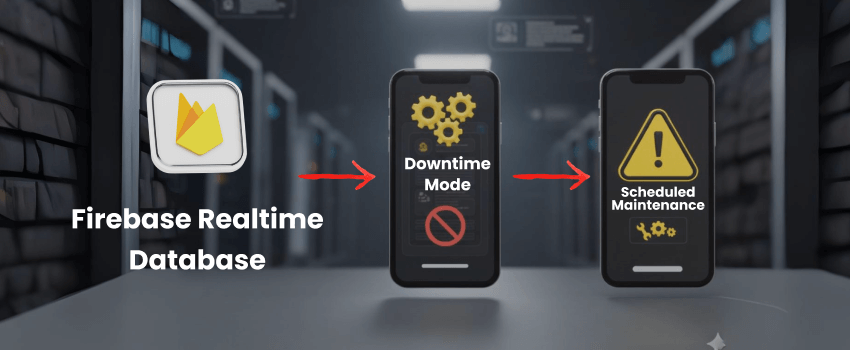
Every serious mobile app needs a clear way to go offline on purpose.When you run database migrations, upgrade backend APIs, or fix a critical bug, you do not want users stuck on spinners, random errors, or half-loaded screens.
A better pattern is to switch the app into maintenance mode remotely, show a friendly message, and still let your internal team test the app behind the scenes.
In this guide, we’ll build that pattern using Firebase Realtime Database as a remote control for maintenance mode across Android and iOS. Thanks to its low-latency, real-time sync, Firebase Realtime Database is perfect downtime banners, and simple app-wide kill switches. You can read more about the core concepts in the official Firebase Realtime Database documentation.
We’ll use the developer implementation you shared as the base, then wrap it in a clean architecture that works in production.
You can technically manage maintenance mode by hardcoding flags in the app or exposing a custom backend endpoint, but both approaches are rigid. They usually require a new release or extra infrastructure every time you want to change a message or toggle downtime. That’s exactly where Firebase Realtime Database fits better.
With Firebase Realtime Database you get benefits like:
Because of this, it’s not just useful for downtime banners. The same pattern works for Firebase Realtime Database examples such as global “app down” screens, per-environment switches (staging vs production), feature toggles, A/B experiments, or even gradual rollouts of new flows all driven from one real-time backend.
Your maintenance mode solution should let admins:
This pattern fits well into your larger Mobile App Development strategy, especially when you want safer releases and better DX for your teams.
Create a simple config node that drives all behavior.
{
  "app_config": {
    "configureMode": "production",
    "maintenanceModeStaging": false,
    "maintenanceModeProduction": true,
    "message": {
      "title": "Scheduled Maintenance",
      "subTitle": "We’ll be back soon!",
      "description": "Our app is currently undergoing maintenance. Please check back later or contact us at",
      "hyperLink": "support@helprapp.com"
    },
    "whitelistIps": {
      "1": "103.120.80.45",
      "2": "122.175.63.109"
    }
  }
}
This gives you:
Your FirebaseRepository should expose a listener for app_config. The core logic in MainActivity (or your root host) looks like this:
private val firebaseRepo = FirebaseRepository()

firebaseRepo.observeAppConfig { config ->
    config?.let {
        val ipList = it.whitelistIps?.values?.toList() ?: emptyList()

        val isMaintenanceModeEnabled = if (BuildConfig.DEBUG) {
            config.maintenanceModeStaging == true
        } else {
            config.maintenanceModeProduction == true
        }

        lifecycleScope.launch(Dispatchers.IO) {
            val publicIp = Utility.getPublicIp()
            val isWhitelisted = publicIp?.let { ipList.contains(it) } ?: false

            withContext(Dispatchers.Main) {
                if (isWhitelisted) {
                    prefHelper.isMaintenanceMode = false
                    if (navController.currentDestination?.id == R.id.downtimeFragment) {
                        navController.navigateUp()
                    }
                } else if (isMaintenanceModeEnabled) {
                    prefHelper.isMaintenanceMode = true
                    if (navController.currentDestination?.id != R.id.downtimeFragment) {
                        val bundle = Bundle().apply { putParcelable("appConfig", config) }
                        navController.navigate(
                            R.id.action_homeFragment_to_downtimeFragment,
                            bundle
                        )
                    }
                } else {
                    prefHelper.isMaintenanceMode = false
                    if (navController.currentDestination?.id == R.id.downtimeFragment) {
                        navController.navigateUp()
                    }
                }
            }
        }
    }
}
What this does:
This is a practical firebase realtime database example of using it as a remote feature switch.
In your nav_graph.xml, add an action from your home/root to the downtime screen
<action

   android:id="@+id/action_homeFragment_to_downtimeFragment"

   app:destination="@id/downtimeFragment"

   app:enterAnim="@anim/fade_in"

   app:exitAnim="@anim/fade_out"

   app:launchSingleTop="true"

   app:popEnterAnim="@anim/fade_in"

   app:popExitAnim="@anim/fade_out" />
This gives you a single place to control how the UI transitions into maintenance mode. Use the config from Firebase to populate the UI in real time:
@AndroidEntryPoint
class DownTimeFragment : BaseFragment() {

    private val args: DownTimeFragmentArgs by navArgs()

    override fun getViewBinding(): FragmentDownTimeBinding =
        FragmentDownTimeBinding.inflate(layoutInflater)

    override fun setUpUI() {
        mBinding.apply {
            val config = args.appConfig

            tvTitle.text = config.message?.title
            tvSubTitle.text = config.message?.subTitle

            val emailText = context?.spannable(
                config.message?.hyperLink ?: getString(R.string.hello_helpr_app_com)
            ) {
                context?.color(R.color.colorRedText)?.let { color -> textColor = color }
                clickableSpan = { sendEmail(requireContext(), SUPPORT_EMAIL) }
            }

            tvDesc.text = TextUtils.concat(config.message?.description, " ", emailText)
            tvDesc.movementMethod = LinkMovementMethod.getInstance()
        }
    }
}
This makes your maintenance message fully dynamic:
<androidx.constraintlayout.widget.ConstraintLayout
    xmlns:android="http://schemas.android.com/apk/res/android"
    xmlns:app="http://schemas.android.com/apk/res-auto"
    android:layout_width="match_parent"
    android:layout_height="match_parent" />

    <LinearLayout
        android:layout_width="wrap_content"
        android:layout_height="wrap_content"
        android:gravity="center"
        android:orientation="vertical"
        app:layout_constraintBottom_toBottomOf="parent"
        app:layout_constraintTop_toTopOf="parent"
        app:layout_constraintStart_toStartOf="parent"
        app:layout_constraintEnd_toEndOf="parent"/>

       <ImageView
            android:layout_width="80dp"
            android:layout_height="wrap_content"
            android:src="@drawable/ic_down_time" />

       <TextView
            android:id="@+id/tvTitle"
            android:text="Scheduled Maintenance"
            android:textSize="20sp"
            android:gravity="center" />

        <TextView
            android:id="@+id/tvSubTitle"
            android:text="This app is currently under maintenance."
            android:textSize="16sp"
            android:gravity="center" />

         <TextView
            android:id="@+id/tvDesc"
            android:text="We’ll be back soon!"
            android:textSize="16sp"
            android:gravity="center" />
  LinearLayout />
androidx.constraintlayout.widget.ConstraintLayout />
You can later expand this with expected return time, icons, or links to support.

On iOS, the idea is the same: listen to the same config and show a full-screen maintenance view for non-whitelisted users.
In AppDelegate:

import FirebaseCore

var maintenanceObserver: MaintenanceObserver?

func application(
    _ application: UIApplication,
    didFinishLaunchingWithOptions launchOptions: [UIApplication.LaunchOptionsKey: Any]?
) -> Bool {
    FirebaseApp.configure()
    maintenanceObserver = MaintenanceObserver()
    return true
}
import FirebaseDatabase

struct AppConfig {
    let maintenanceModeProduction: Bool
    let maintenanceModeStaging: Bool
    let message: Message
    let whitelistIps: [String]
}

struct Message {
    let title: String
    let subTitle: String
    let description: String
    let hyperLink: String
}

class MaintenanceObserver {

    private var ref: DatabaseReference!
    private var maintenanceHandle: DatabaseHandle?

    init() {
        ref = Database.database().reference()
        observeAppConfig()
    }

    deinit {
        if let handle = maintenanceHandle {
            ref.removeObserver(withHandle: handle)
        }
    }

    func getPublicIPAddress() -> String {
        var publicIP = ""
        do {
            publicIP = try String(
                contentsOf: URL(string: "https://www.bluewindsolution.com/tools/getpublicip.php")!,
                encoding: .utf8
            ).trimmingCharacters(in: .whitespaces)
        } catch {
            print("Error: \(error)")
        }
        print("publicIP : \(publicIP)")
        return publicIP
    }

    func observeAppConfig() {
        let appConfigRef = ref.child("appConfig")    // or "app_config" based on your schema

        appConfigRef.observe(.value, with: { snapshot in
            guard let dict = snapshot.value as? [String: Any] else { return }

            let maintenanceModeProduction = dict["maintenanceModeProduction"] as? Bool ?? false
            let maintenanceModeStaging = dict["maintenanceModeStaging"] as? Bool ?? false

            var ipList: [String] = []
            if let ipsDict = dict["whitelistIps"] as? [String: Any] {
                ipList = ipsDict.values.compactMap { $0 as? String }
            }

            let messageDict = dict["message"] as? [String: Any] ?? [:]
            let title = messageDict["title"] as? String ?? ""
            let description = messageDict["description"] as? String ?? ""
            let subTitle = messageDict["subTitle"] as? String ?? ""
            let hyperLink = messageDict["hyperLink"] as? String ?? ""

            let message = Message(
                title: title,
                subTitle: subTitle,
                description: description,
                hyperLink: hyperLink
            )

            let appConfig = AppConfig(
                maintenanceModeProduction: maintenanceModeProduction,
                maintenanceModeStaging: maintenanceModeStaging,
                message: message,
                whitelistIps: ipList
            )

            self.handleMaintenanceModeChange(
                isMaintenanceModeProduction: appConfig.maintenanceModeProduction,
                isMaintenanceModeStaging: appConfig.maintenanceModeStaging,
                ipAddresses: appConfig.whitelistIps,
                title: appConfig.message.title,
                subtitle: appConfig.message.subTitle,
                description: appConfig.message.description,
                hyperlink: appConfig.message.hyperLink
            )
        })
    }

    private func handleMaintenanceModeChange(
        isMaintenanceModeProduction: Bool,
        isMaintenanceModeStaging: Bool,
        ipAddresses: [String],
        title: String,
        subtitle: String,
        description: String,
        hyperlink: String
    ) {
        if isMaintenanceModeProduction || isMaintenanceModeStaging {

            let isProd = UIApplication.shared.inferredEnvironment == .appStore
            let isStag = UIApplication.shared.inferredEnvironment != .appStore

            let publicIPAddress = getPublicIPAddress()

            if ipAddresses.contains(publicIPAddress) {
                print("App is live for specific IP address.")
                if let topVC = UIApplication.topViewController() as? MaintainenceViewController {
                    topVC.dismiss(animated: true)
                }
            } else {
                print("App is in maintenance mode.")
                if (isProd && isMaintenanceModeProduction) || (isStag && isMaintenanceModeStaging) {

                    if let topVC = UIApplication.topViewController() as? MaintainenceViewController {
                        topVC.tabBarController?.selectedIndex = 0
                        topVC.dismiss(animated: true) {
                            self.presentMaintenanceVC(
                                title: title,
                                subtitle: subtitle,
                                description: description,
                                hyperlink: hyperlink
                            )
                        }
                    } else {
                        UIApplication.topViewController()?.tabBarController?.selectedIndex = 0
                        self.presentMaintenanceVC(
                            title: title,
                            subtitle: subtitle,
                            description: description,
                            hyperlink: hyperlink
                        )
                    }
                } else {
                    print("App is live.")
                    if let topVC = UIApplication.topViewController() as? MaintainenceViewController {
                        topVC.dismiss(animated: true)
                    }
                }
            }
        } else {
            print("App is live.")
            if let topVC = UIApplication.topViewController() as? MaintainenceViewController {
                topVC.dismiss(animated: true)
            }
        }
    }

    private func presentMaintenanceVC(
        title: String,
        subtitle: String,
        description: String,
        hyperlink: String
    ) {
        let topVC = UIApplication.topViewController()
        let vc = MaintainenceViewController(nibName: "MaintainenceViewController", bundle: nil)
        vc.maintainanceTitle = title
        vc.maintainanceSubtitle = subtitle
        vc.maintainanceDescription = description
        vc.maintainanceHyperlink = hyperlink
        vc.modalPresentationStyle = .fullScreen
        topVC?.present(vc, animated: true, completion: nil)
    }
}
This mirrors the Android behavior:
whitelistIpsOnce Android and iOS are wired:
"maintenanceModeProduction": true in Firebase → non-whitelisted users should see the downtime screen.whitelistIps → app should stay live for your device.message content → both platforms update instantly without a store release.You can also combine this with other patterns from your Firebase Push Notification in JavaScript Apps implementation, for example sending a push notification before you flip maintenance on.
Implementing app-wide downtime handling is not just a “nice to have.” It is part of building reliable, production-grade systems. By pairing Firebase Realtime Database with clean Android and iOS implementations, you get a flexible, real-time maintenance mode that keeps users informed while your team works safely behind the scenes.
If you’re planning to embed this pattern into a larger roadmap feature flags, rollout strategies, or AI-driven experiences it helps to work with an experienced AI Development Agency and Company that understands both backend architecture and mobile delivery. That way, maintenance mode becomes one small, well-designed piece of a much more resilient product.
Written by Poorvesh Modasiya
Mobile Application Developer with 6 years of experience building high-quality Android and Flutter apps using Kotlin and Dart. Skilled in scalable architecture (MVVM, Clean Architecture), modern frameworks (Jetpack Compose,GetX, Riverpod), and CI/CD automation. Experienced in delivering secure, user-centric apps across domains like e-commerce, healthcare, fintech, and logistics, and publishing on Play Store & App Store.

November 25, 2025

November 12, 2025